
A bench is a PC with instruments plugged into it. Without anything managing it, running the platform there is hand work: a virtual environment per device, versions pinned by hand, a terminal per server, and no answer to "is the spectrometer actually up?" beyond looking.
plesty-server is the program that removes that. It installs device modules,
starts their servers, watches them, keeps their logs, and runs field tests
against the instruments — so a bench is something you set up once.
It is not the device manager (the booking portal for people), and it is not a device module. It sits beside the servers it runs, and experiments never talk to it: they talk to the device servers directly.
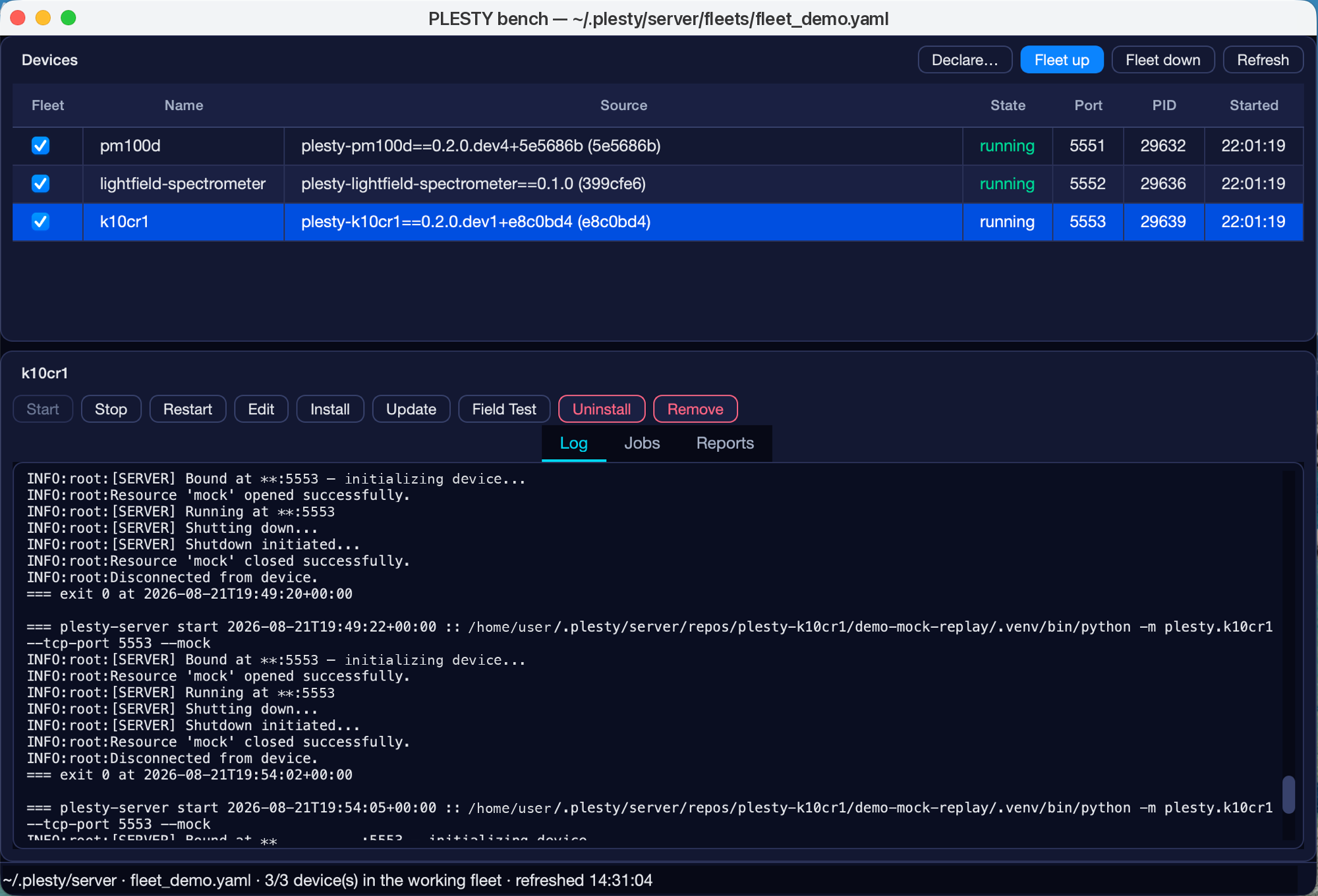
Most of what this page describes is visible in that one window. Three instruments — a powermeter, a spectrometer and a rotation stage — are declared on one bench and running side by side.
The table is the fleet, and each row carries the package and the exact
version it was installed from: three different modules, three separate
environments, upgraded independently of one another. The ports are 5551,
5552 and 5553, allocated in sequence rather than chosen by anyone, because
every device left to itself would take the same default and collide.
running beside a port and a pid is the record and the probe together — a
process exists and the server answered.
The checkbox in the first column is the working fleet: which devices
fleet up starts together, so a bench comes back after a reboot without
anyone starting three servers by hand. Below, the tabs are the log, the
jobs that installs and updates run as, and the field-test reports. The
status bar names the home directory everything is written under, and the
fleet file this bench opened.
The console is one face of the bench, not the bench itself. Everything in it
is also a plesty-server command, which is what makes a bench scriptable and
what the remote client drives.
One home directory
Everything the bench writes lives under one directory — ~/.plesty/server by
default. A bench can therefore be wiped, backed up or moved as a whole, and
nothing it owns is scattered across the machine.
~/.plesty/server/
├── fleet.yaml          what this bench declares: package, version, args, port
├── packages/           one environment per (package, version)
├── repos/              git checkouts, one per (package, ref)
├── state/              one record per started server
├── run/<name>/         each server's working directory
├── logs/               per-server logs, and one log per job
└── jobs/               job records
One environment per (package, version) is the part worth noticing. Two
devices needing different versions of the same module get one environment
each, and a device pinned to a version keeps working when another is
upgraded. Installing is not a global operation on the bench.
Nothing is a child process
A device server is launched detached, not as a child of the bench. That is a deliberate choice with a consequence worth stating plainly: closing the bench does not stop the instruments. A console can be restarted, updated or crash, and the measurement keeps running.
The bench therefore cannot rely on process parentage to know what is happening, and asks the world instead:
- A record in
state/says what was started, with which pid, on which port. - A probe — an actual connection to the port — says whether the server is answering. A pid only says an interpreter is running.
Both are needed. A pid that exists with nothing listening is a server that died on startup; a port that answers with no record is a server the bench lost track of, or someone else's. Status reports the combination rather than guessing from either alone.
Stopping walks an escalation — interrupt, then terminate, then kill the process tree — so a server gets the chance to close its instrument session cleanly before anything forceful happens.
Jobs
Installing a module, updating a checkout and running a field test all take minutes, not milliseconds. Each runs as a job: a separate process with its own record and its own log, which the console or the CLI follows rather than blocks on. A job that is still running when you close the window is still running when you come back.
Ports, in one line
Every device server binds one TCP port, and the bench is the only thing that sees all of them at once. It allocates from 5551 upward, keeps 5550 for its own agent, and writes each choice into the fleet file so the port a client used yesterday is the port it finds today. A port the declaration names is never moved, because that number is passed to the device itself.
The full rules — and what happens when a port is already taken — are in the plesty-server documentation.
Driving a bench from elsewhere
The console is bench-local by design. A developer working from their own
machine does not need it: the bench runs a small agent, and the
plesty-bench client drives the install → update → field-test loop remotely.
Experiments never use either — they reach the device servers directly, over
the same TCP protocol any client uses.
Read next
- Quickstart — build a working bench on your own PC, with no instruments attached.
- TCP Communication — the protocol the servers the bench starts are speaking.
- plesty-server documentation — the command line, the console, packaging and the remote agent in full.