
An experiment module is one kind of measurement: a plan of steps that
drives several instruments and records what they return, one folder per run
(see Data Flow). This guide builds one from
nothing: power-dependent photoluminescence (PL) of a quantum dot — a
simpler version of the lab's plesty-pow-pl.
The excitation laser passes a half-wave plate on a rotation stage, then a fixed polariser, so turning the plate sets the power that reaches the sample. The plate turns from 0° to 180° in 2° steps. At every angle the spectrometer takes one spectrum, and the power meter reads the excitation power alongside it — so each spectrum carries the power it was measured at. That is 91 rows, then an analysis of the power against the angle.
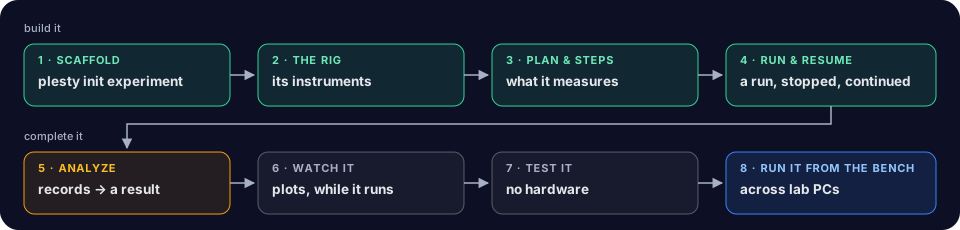
- Scaffold —
plesty init experiment, and what it writes. - The Rig — the three instruments, reached by name.
- Run Setup — which devices a run uses, and on which bench.
- Plan & Steps — the plan, and what one row does.
- Run & Resume — run it, stop it, continue it, read it back.
- Analyze — fit the excitation power, and report the fit.
- Watch It — the spectrum, the map and the power, live.
- Test It — the contract gates, without hardware.
- Run It from the Bench — the same module, run across lab PCs from PLESTY Bench.
What you need
- plesty-sdk for
plesty init—uv tool install plesty-sdk. - plesty-server, which installs and runs instrument servers from a
terminal —
uv tool install plesty-server. - The three instruments, replaying a real measurement. The stage
(
plesty-k10cr1), the spectrometer (plesty-lightfield-spectrometer) and the power meter (plesty-pm100d) all run in--mock— but these mocks do not invent their answers: they replay a sweep really measured on 4 August 2026, which thedemo/mock-replaybranch of each module carries. The stage writes the angle it reached into a folder all three share, and the other two answer for that angle.
Save this as fleet.yaml in an empty folder — a fleet is the list of
instrument servers one PC runs:
version: 1
home: ~/.plesty/tutorial              # where the servers are installed, apart from any bench of yours
devices:
  pm100d:
    package: plesty-pm100d
    git: https://gitlab.com/plesty/hub/devices/thorlab/plesty-pm100d.git
    ref: demo/mock-replay
    args: [--mock]
    env: {PLESTY_MOCK_BENCH: ~/plesty-tutorial/bench}
    autostart: true
  k10cr1:
    package: plesty-k10cr1
    git: https://gitlab.com/plesty/hub/devices/thorlab/plesty-k10cr1.git
    ref: demo/mock-replay
    args: [--mock]
    env: {PLESTY_MOCK_BENCH: ~/plesty-tutorial/bench}
    autostart: true
  spectrometer:
    package: plesty-lightfield-spectrometer
    git: https://gitlab.com/plesty/hub/devices/princeton_instruments/lightfield_spectrometer.git
    ref: demo/mock-replay
    args: [--mock]
    env: {PLESTY_MOCK_BENCH: ~/plesty-tutorial/bench, DEVICE_DATA_ROOT: ~/plesty-tutorial/data, DEVICE_DATA_PATH: ~/plesty-tutorial/data}
    autostart: true
Then, in that folder, install and start all three:
plesty-server -f fleet.yaml fleet up
NAME          STATE    PID    PORT  STARTED                    DETAIL
pm100d        running  10957  5551  2026-10-26T14:20:42+00:00
k10cr1        running  11011  5552  2026-10-26T14:20:50+00:00
spectrometer  running  11229  5553  2026-10-26T14:20:53+00:00
plesty-server -f fleet.yaml fleet down stops them again. The spectrometer
saves each spectrum under ~/plesty-tutorial/data — DEVICE_DATA_ROOT is the
one folder it may write in, DEVICE_DATA_PATH where it writes until a run
sends it elsewhere. That folder is the shared data disk of this one-PC setup, so the experiment you build points its LOCAL_DATA there
too (see The Rig). Every output on these pages is from
this setup.
plesty-pow-pl is the production
experiment of this measurement.