
A viewer draws a run while it happens. It only reads the run's folder —
the new lines of records.jsonl at each refresh — so it never slows or
disturbs the measurement, and any number can watch one run (see
Data Flow).
The viewer
An experiment ships its viewer as a file of its own, plesty/demo_pow_pl/viz.py:
"""The live view of a run: the newest spectrum, the spectral map and the power."""

import sys
from typing import Any

from plesty.lib.data import SpectrumData
from plesty.lib.experiment import Run
from plesty.lib.monitor import Viz
from plesty.lib.monitor.common import Series, Spectrum, SpectrumMap


def read_spectrum(row: dict[str, Any], run: Run) -> dict[str, Any]:
    """Open the spectrum a row names, for the two spectrum plots."""
    if "data_file" not in row:
        return {}
    spectrum = SpectrumData.load(run.local(row["data_file"]))
    counts = spectrum.intensity.reshape(-1, spectrum.intensity.shape[-1]).sum(axis=0)
    return {"wavelength": spectrum.wavelength, "counts": counts}


viz = Viz("Power PL", experiment="experiment", run_root="runs", reads=read_spectrum)
viz.add_plot(Spectrum(area="top"))
viz.add_plot(SpectrumMap(row="hwp_deg", y_label="HWP angle (deg)", area="top"))
viz.add_plot(
    Series("power_w", x="hwp_deg", y_label="Power (W)", x_label="HWP angle (deg)", area="top")
)

if __name__ == "__main__":
    sys.exit(viz.main())
Vizis the viewer: which experiment's runs it shows (by the name in their run ids), and where to find them —runsunder the shared disk.reads=opens the file a row names — here the.spespectrum, found on this PC withrun.local()— once per row, so the plots only ever see numbers. The spectrum's frames are summed into one line of counts.Spectrum,SpectrumMapandSeriesare ready-made plots fromplesty.lib.monitor.common: the newest spectrum, every spectrum so far as one row of a map against the plate angle, and one value of the records against another.areais the side of the window a plot starts on. Plots sharing an area are split against each other:"top"stacks them as rows, the default"right"sets them side by side.weightsets how much of that space each one takes. The operator can rearrange them, and the viewer remembers it.
The window needs plesty-lib's gui extra, and rendering a video its record
extra:
uv add "plesty-lib[gui,record]"
Watch, replay, render
uv run python -m plesty.demo_pow_pl.viz monitor             # a window following the newest run
uv run python -m plesty.demo_pow_pl.viz monitor --replay 2  # play a finished run back
uv run python -m plesty.demo_pow_pl.viz render              # the run as a video, no window
A replay holds and continues with Replay ▸ Pause/Resume, or the space bar.
The viewer finds runs under PLESTY_DATA, the variable PLESTY Bench sets for
a run. From a terminal, set it yourself to the shared disk —
export PLESTY_DATA=$HOME/plesty-tutorial/data — and pass --run <id> for a
run other than the newest.
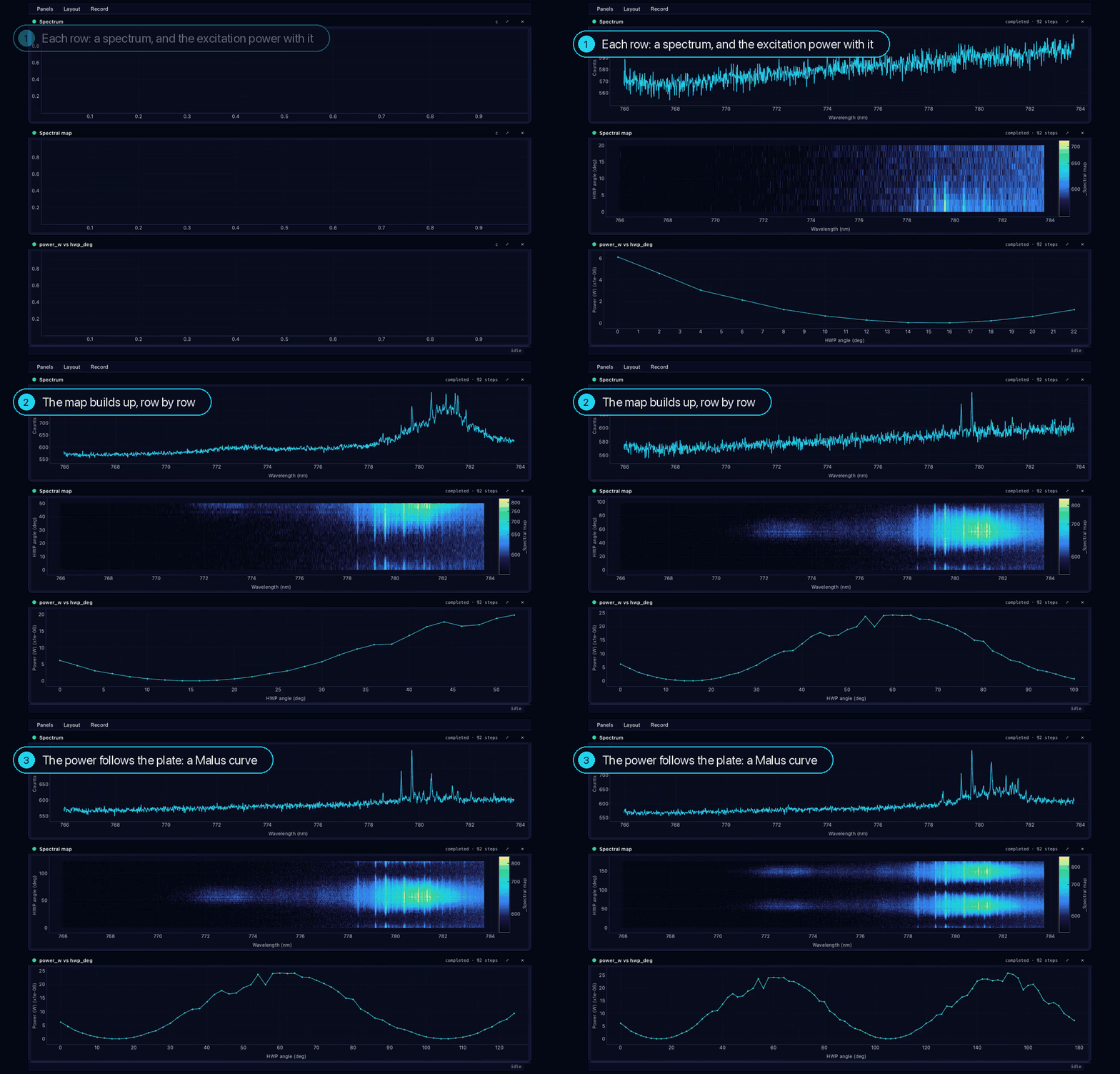
What it shows is what was measured: a faint set of quantum-dot lines between 778 and 783 nm on a background of 550–600 counts, the map's lines brightening and dimming with a 90° period as the plate turns, and the power tracing the two periods of the Malus curve Analyze fitted.
Your own plot
A plot is a function of the run's data returning what to draw — lines, scatter points, images, numbers:
import numpy as np
from plesty.lib.monitor import Line, RunData


@viz.plot("Power, normalised")
def normalised(data: RunData) -> list[Line]:
    """The power at each angle, relative to the highest reading."""
    power = data.column("power_w")
    return [
        Line(
            x=data.column("hwp_deg"),
            y=power / np.nanmax(power),
            x_label="HWP angle (deg)",
            y_label="Power / max",
        )
    ]
data holds every row read so far, with what reads= returned merged in —
column, latest, stack pick fields out of it. column gives nan for a
row without the field, such as the analysis row — hence nanmax; and
data.stack("counts") is every spectrum as one array, 91 × 1340 here.
In PLESTY Bench, the run's Visualization pane shows this same viewer.
Next: Test It.