
In a lab, instruments are plugged into different PCs. With a second PC the demo runs the same way: the stage is on one bench (a PC running PLESTY Bench), the spectrometer on another, and one window drives both. Try the Welcome Demo on one PC first — the experiment, the run and the result are the same.
You need:
- PLESTY Bench on both PCs — from the Download page.
- A shared disk — one folder both PCs can reach and write to, each under its own path (
/mnt/plestyon one,D:\plestyon the other). PLESTY calls it the Plesty share. Each measurement, a run, gets its own folder there, so the spectrometer on the second PC saves its spectra straight into the run. - The network between them.
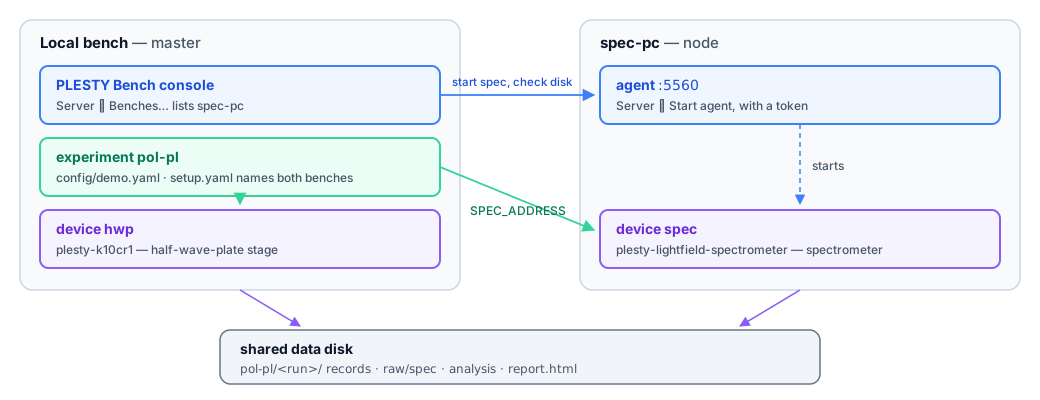
- The local bench is the master: its window shows and drives both benches, and it runs the experiment and the stage.
- spec-pc is a node: it serves its own instruments. Its agent — a small service guarded by a password-like token — is how the master asks it to start or stop them.
The steps
The bench documentation has every click and screenshot: Run a cross-bench experiment. Here is what each step is for.
1. Tell each bench where the share is. On both PCs, Server ▸ Configure…: Plesty share is the shared disk as that PC mounts it, and Bench folder that bench's own folder in it, created when missing. Every device a bench starts writes under its bench folder, and names its files relative to the share, so any PC reads them back. The Windows installer asks for both too; Skip leaves them for later. Since PLESTY Bench 0.5.0.
2. Install the spectrometer on spec-pc from Hub ▸ Browse… — plesty-lightfield-spectrometer as Repository (git) at ref demo/pol-pl, the branch that replays the measured spectra. Then, on spec-pc, Server ▸ Configure… generates the agent's Token to copy, and Server ▸ Start agent starts it.
3. Make the local bench the master. In Server ▸ Configure… set Role to master, then add spec-pc under Server ▸ Benches… with its address and the token. From then on spec-pc's spectrometer appears in the local window, with spec-pc as its host.
4. Install the experiment and create a run on the local bench: plesty-pol-pl from Hub ▸ Browse…, then Create on the Experiments tab with config/demo.yaml.
5. Tell the experiment where its instruments are. In the run's Configure ▸ Device Setup, spec-pc is added as a bench, the spectrometer is placed on spec-pc and the stage on this bench. Save.
6. Run it. First the share is checked from both benches — if they do not see the same folder, the run stops and says which bench is wrong. Then each instrument is started on its own bench, and the run goes on as on one PC.
7. Read the result. The same as on one PC — the result — and both instruments are stopped again, each on its bench.
Read next
- Networking — masters, nodes and agents in full.
- Data Flow — why large files never cross the network twice.